
The AAX build is macOS only right now, and Pro Tools 2024.3 is the earliest version that hosts third-party MIDI plugins.
Overview
MidiBro runs in Pro Tools as AAX plugins, with the same two-part design as in every other DAW:
- MidiBro Master: the browser and controller. Your library, the MidiStack, the key and chord tools.
- MidiBro Receiver: a small MIDI plugin you place on each instrument track. It plays the MidiStack row you route to it into that track’s virtual instrument.
Master and Receiver talk to each other in the background, with no manual MIDI cabling. The tracks need no MIDI input either; both stay on no input.
There are two senders, and you can mix them in one session:
- Straight from the Master. Put your instrument on the insert below the Master on its own track. A MidiStack row whose output is set to This track (MidiBro Master) leaves through the Master’s own MIDI output and plays it. No Receiver needed.
- Through a Receiver. All direct rows share that one output, so every further instrument gets a MidiBro Receiver of its own on its own track.
Prerequisites
- Pro Tools 2024.3 or newer
- macOS. There is no Windows AAX build yet.
- The MidiBro AAX plugins in
/Library/Application Support/Avid/Audio/Plug-Ins/:MidiBro Master.aaxpluginMidiBro Receiver.aaxplugin
Pro Tools rescans plugins on launch. After installing, a Plugin Added dialog confirms MidiBro is available.
Setup
- 1#
Add the Master once. Create an Instrument track (Track -> New -> Instrument), click Insert A and choose plugin -> Instrument -> MidiBro Master. Its window opens with the library browser, where you find loops and build MidiStack rows. Put an instrument on Insert B of that same track and the Master can play it directly.
- 2#
Add a Receiver to each further instrument track. Click an Insert slot, open the menu and choose MIDI plugin. MidiBro Receiver is listed there, next to the stock MIDI plugins.
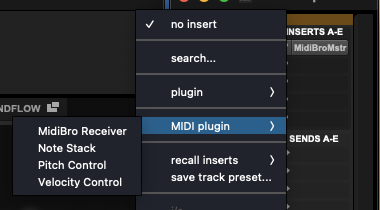
The insert menu: MIDI plugin, then MidiBro Receiver - 3#
Put your virtual instrument on the insert below the Receiver (plugin -> Instrument). The Receiver’s MIDI flows down the insert chain into it. The Master does not have to be on this track.
- 4#
Check the Receiver’s header. It reads Connected, ready and names the Master it found. Pro Tools labels the slot as a MIDI Node.
- 5#
In the Master, set the output of the MidiStack row: the Receiver’s name, or This track (MidiBro Master) for the instrument sitting behind the Master. Launch a cell, and that track’s instrument plays.
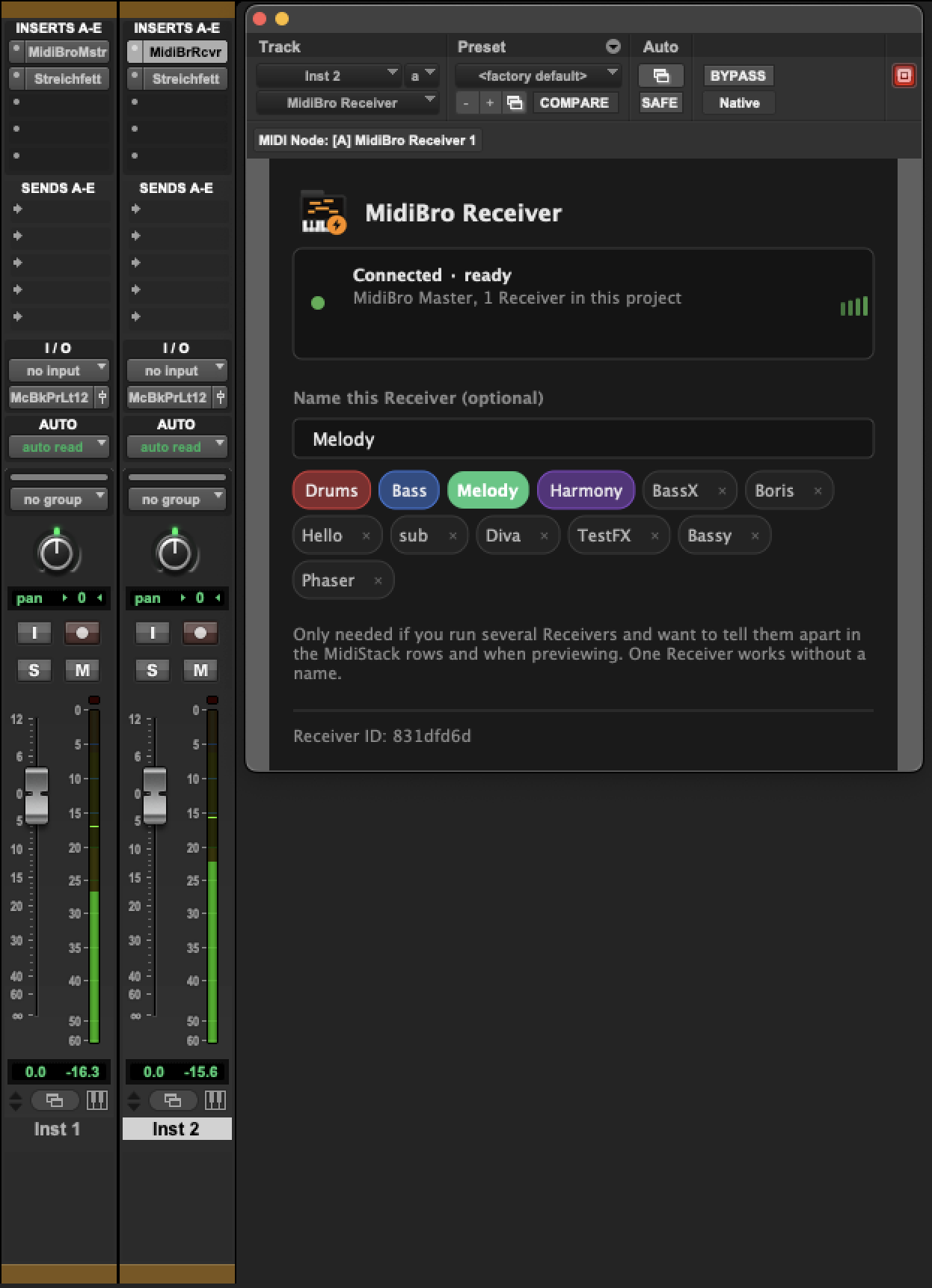
Naming a Receiver
A Receiver works without a name. Naming it (Drums, Bass, Melody) only matters once several Receivers run in one session and you need to tell them apart in the MidiStack rows and while previewing.
Which plugin variant
Use MidiBro Receiver, which is an AAX MIDI Effect. That is why it appears under MIDI plugin while the Master, an AAX Instrument, appears under plugin -> Instrument. There is no MidiBro Receiver Instrument for AAX.
Troubleshooting
| Problem | Solution |
|---|---|
| Receiver not available as an insert | Needs Pro Tools 2024.3 or newer, and it has to go on an Instrument track |
| Neither plugin shows up at all | Check both .aaxplugin bundles are in /Library/Application Support/Avid/Audio/Plug-Ins/, then relaunch. Pro Tools only rescans at launch |
| No sound | A virtual instrument has to sit on an insert below the Receiver on the same track, the track must not be muted, and the row must be routed to that Receiver |
| Header says “Disconnected” | Confirm the Master is loaded; they connect automatically, allow a few seconds |