
Overview
MidiBro is plugin-only (no standalone app for playback). In Logic you use two of the MidiBro plugins, both AU:
- MidiBro Master: the brain. Browse, arrange and launch patterns here. By itself it makes no sound apart from its built-in preview synth, and it sends no MIDI to other Logic tracks.
- MidiBro Receiver: a MIDI plugin that plays a pattern into the instrument on its own track.
They find each other automatically. There is no MIDI cabling in Logic.
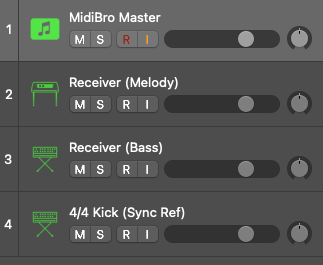
Prerequisites
- Logic Pro 10.5 or newer
- MidiBro Master AU:
/Library/Audio/Plug-Ins/Components/MidiBro Master.component - MidiBro Receiver AU:
/Library/Audio/Plug-Ins/Components/MidiBro Receiver.component
Setup
- 1#Master track. Create a Software Instrument track and load MidiBro Master as the instrument (AU Instruments -> ivoschi -> MidiBro Master). This is your control window, and it stays silent.
- 2#Receiver track, one per sound. Create another Software Instrument track:
- In the Instrument slot, load a real instrument (synth, piano, sampler).
- In the MIDI FX slot above it, load MidiBro Receiver (AU MIDI-controlled Effects -> ivoschi -> MidiBro Receiver).
- Give the Receiver a name (Bass, Melody). The Master routes a pattern row to that name.
- Order on the track: MidiBro Receiver (MIDI FX) -> real instrument.
- 3#Repeat step 2 for each extra part.
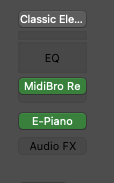
Connected Receivers show as green dots at the top of the Master window.

Where the sound comes from
- Through a Receiver, the normal way. The Receiver plays the pattern into the instrument on its track, and that instrument is what you hear. One Receiver track is one voice.
- Through the Master’s built-in GM synth. The Master has its own General MIDI synth (Internal Synth (GM)) for a quick preview without setting up a Receiver.
No Receiver and no internal GM means no sound. The Master is the controller, not a sound source.
Recording a pattern as a MIDI region
Verified 2026-07-18: recording works directly, with no IAC or External-MIDI detour, and nothing is lost at the start of a take.
Use a clean Receiver track: MidiBro Receiver in the MIDI FX slot, the real instrument directly below it, nothing else in the MIDI FX chain.
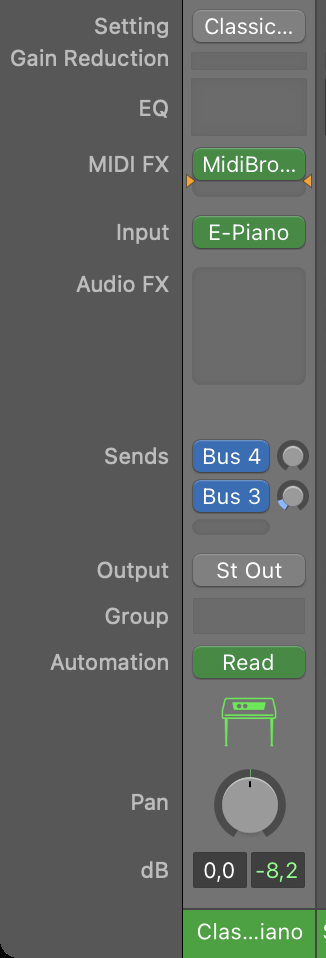
Clean channel strip: MIDI FX is the Receiver, the instrument sits right below Hover the Receiver’s MIDI FX slot, click the small chevron on the right and switch on Record MIDI to Track Here. This is a Logic feature, not a MidiBro one: it points the channel strip’s internal MIDI input at that slot’s output.
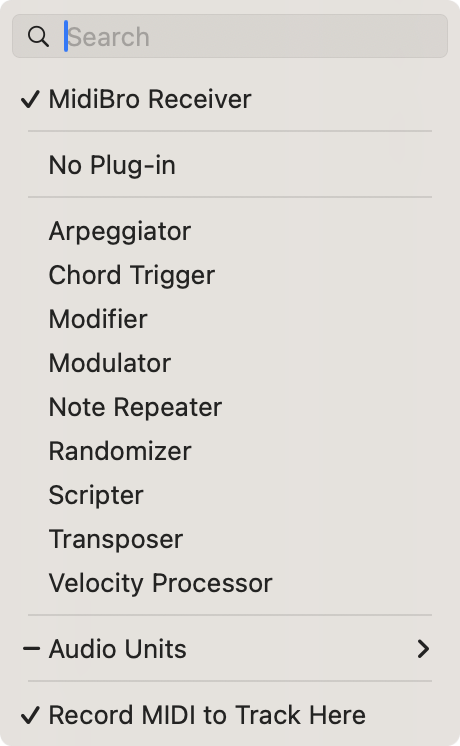
The slot menu with both checkmarks: the Receiver is loaded and “Record MIDI to Track Here” is on In the Master, check that the MidiStack row you want is routed to that Receiver, not to the Master’s own output.
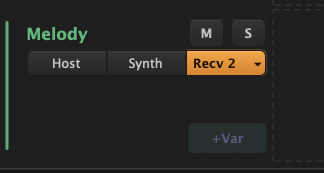
Row output selector: the Receiver is the active target, shown in orange Select the Receiver’s track so it is record-armed, put the playhead on a free bar and hit Record. An already looping cell re-syncs to Logic’s transport on its own.
Plain arranger recording on that track now captures real, editable notes.
The trap that looks like a bug: if the row is routed to the Master’s own output instead of a Receiver, the Receiver gets nothing and Logic correctly records nothing. What you end up with is not an empty region but a near-invisible stub holding a few housekeeping events. It is easy to misread as “MidiBro does not record in Logic”, because that output plays through the Master’s Internal Synth (GM), which can sound close enough to your real instrument that the mix-up is not obvious by ear. Check the row’s routing chip before troubleshooting anything else.
Clicking a pattern’s play icon in the browser table plays through the same target, so the same setup captures it. It takes roughly a bar after the click before sound starts, which is preview latency, not lost data.
Which plugin variant
Use MidiBro Receiver, the AU MIDI-controlled Effects build, in the MIDI FX slot. Do not use MidiBro Receiver Instrument in Logic; that variant ships as VST3 only, so Logic never sees it.
Standalone Master
The Master also runs as a standalone app and will still find and connect to Receivers loaded in Logic, green dots and all. It is not a way to play along with a project: the standalone runs on its own clock and follows neither Logic’s transport nor its tempo or bar position. For anything that has to stay in sync, run the Master as a plugin inside Logic.
Troubleshooting
| Problem | Solution |
|---|---|
| Receiver not in the MIDI FX menu | Rescan AU: Logic Pro -> Settings -> Plug-in Manager |
| No sound | The Receiver must be in the MIDI FX slot, not the Instrument slot |
| No green dot for a Receiver | Confirm the Master is loaded; they connect automatically, allow a few seconds |
| Recording produces an almost empty region | The MidiStack row is routed to the Master’s own output instead of the Receiver |
| Standalone Master drifts out of time | Expected. Use the plugin Master inside Logic for anything synced |