
Overview
MidiBro is plugin-only (no standalone app). Two plugins work together:
- MidiBro Master: the browser and controller. Load it once; it makes no sound.
- MidiBro Receiver Instrument: plays the selected MidiStack cell; you route its MIDI to your synth.
Master and Receivers connect automatically over MidiBro’s internal link. You do not route MIDI between Master and Receiver by hand.
Cakewalk only lets MIDI out of a plugin that is hosted as an instrument and has MIDI output enabled, so MidiBro uses the Instrument variant plus a MIDI track.
Prerequisites
- Cakewalk Sonar, or the older Cakewalk by BandLab
- MidiBro Master VST3 and MidiBro Receiver Instrument VST3
- Windows:
C:\Program Files\Common Files\VST3\(vendor: ivoschi)
- Windows:
Setup
- 1#Insert MidiBro Master as a soft synth (Synth Rack). It stays silent; this is your browser/controller.
- 2#Insert MidiBro Receiver Instrument as a soft synth, and switch on Enable MIDI Output for it (see the next section, it is well hidden).
- 3#Insert your synth, the instrument that actually makes the sound.
- 4#Create a MIDI track. Set its Input to MidiBro Receiver Instrument (MIDI output) and its Output to your synth. Turn on Input Echo.
- 5#In the Master, assign the Receiver as the output for a MidiStack row, then launch a cell, and the synth plays.
The hidden checkbox: Enable MIDI Output
This is the step nobody finds on their own, and it cost the most support time of any DAW. Cakewalk hides the MIDI ports of a plugin by default, so a plugin that emits MIDI is simply absent from every other track’s input list until you switch this on.
Open the plugin window and drag it wider until the gear icon appears next to the VST3 button, then enable Enable MIDI Output (French: Activer la sortie MIDI). The entry above it, Enable MIDI Input, is greyed out and already ticked, which matches Cakewalk’s rule that enabling output also enables input.
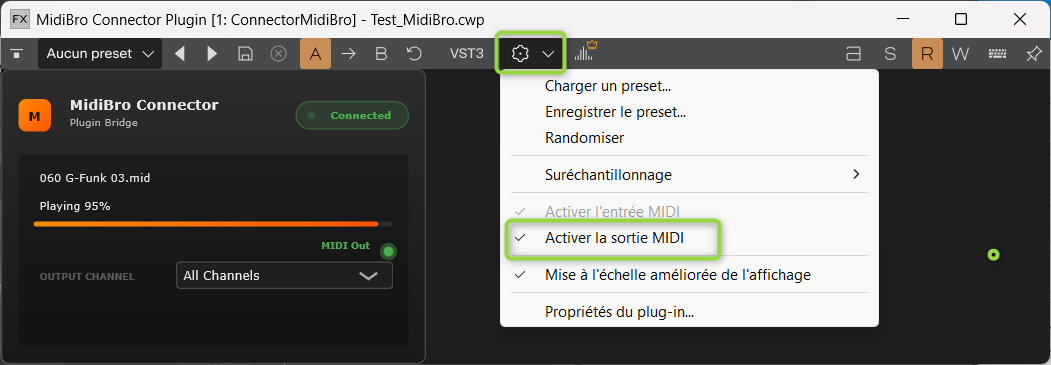
Two traps come with it:
- No gear icon means the window is too narrow. Drag it wider.
- Setting it through Utilities -> Cakewalk Plug-in Manager applies to new instances only. A plugin already in the project has to be deleted and inserted again.
Where it applies: on the Receiver, so it can hand its MIDI to a MIDI track. You do not need it for the link between Master and Receiver, because those two talk to each other directly and never go through Cakewalk’s routing.
The simple setup, without a Receiver
For a single instrument you can skip the Receiver entirely: host MidiBro Master as a soft synth and let it play the instrument on another track. This is the configuration a beta tester runs in Sonar today, and it is the part of this guide that is confirmed rather than inferred.
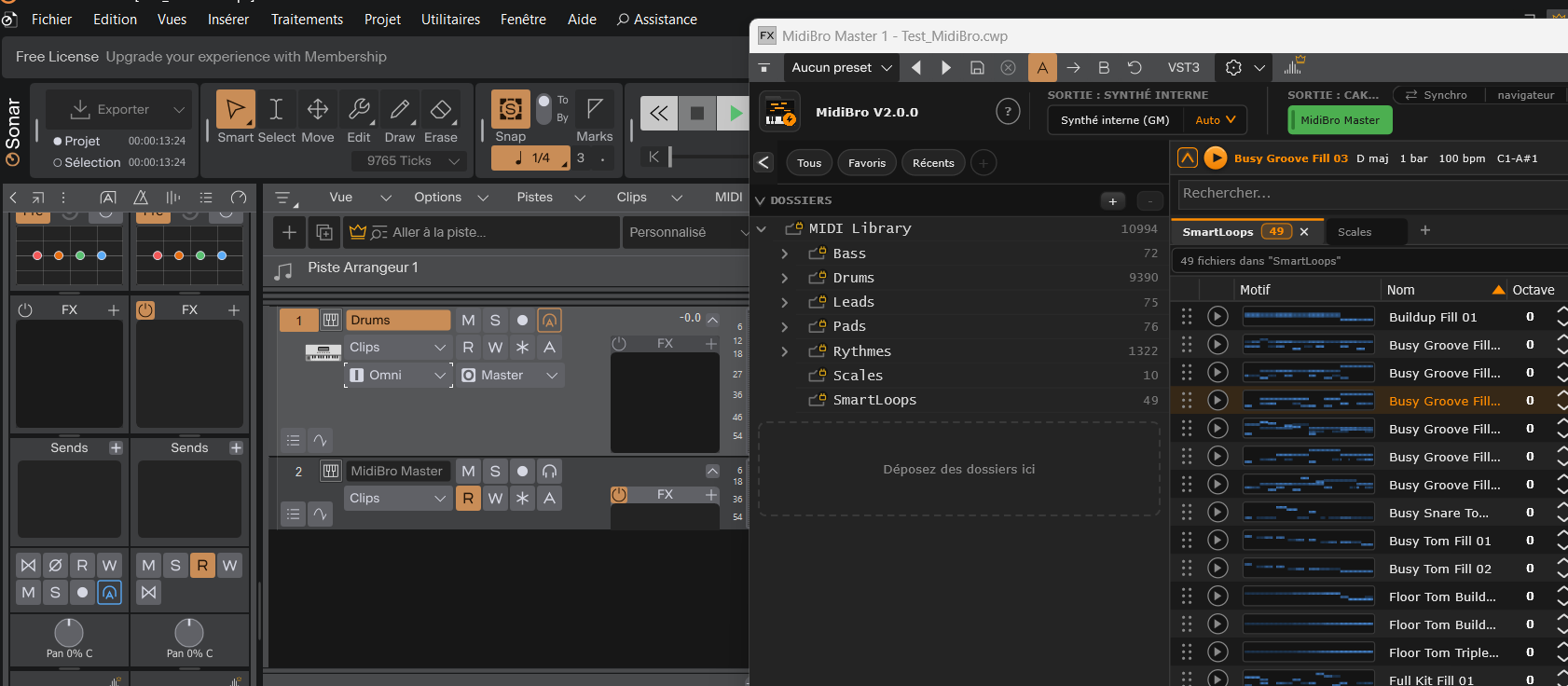
Two tracks are enough: the target instrument (here Drums, input Omni) and the MidiBro Master track.
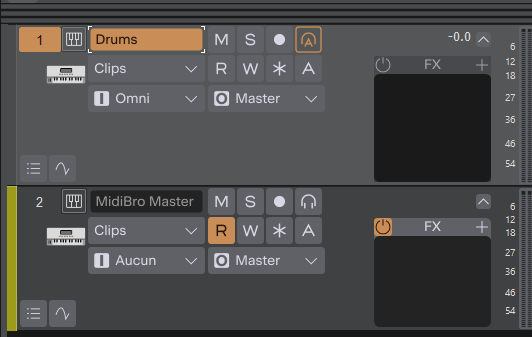
In this setup the Master does not need Enable MIDI Output, because its MIDI never leaves that track.
If you hear nothing, turn on Input Echo for the instrument track. Cakewalk echoes MIDI input on the current track, which is why the setup can look like it only works while the target track happens to be selected. Input echo is the switch that makes it independent of the selection.
Settings that keep playback running
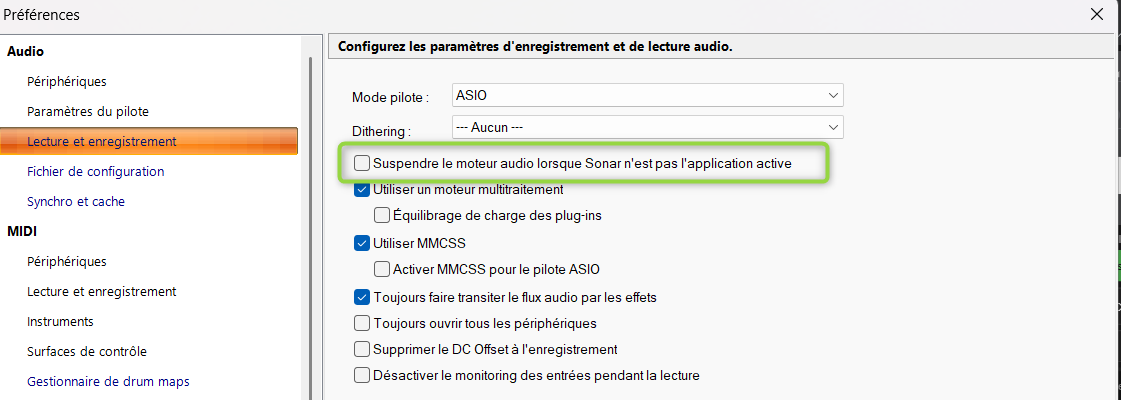
Preferences -> Audio -> Playback and Recording:
- Suspend Audio Engine When Cakewalk Is Not in Focus is on by default. Clicking into another window then releases the audio engine and playback stalls. Turn it off.
- Always Stream Audio Through FX keeps effects processed on tracks that carry no audio data. Recommended alongside the above.
Which plugin variant
Use MidiBro Receiver Instrument (VST3), with Enable MIDI Output checked so Cakewalk exposes its MIDI as a track input. The plain MIDI-FX Receiver cannot sit in front of an instrument in Cakewalk.
Troubleshooting
| Problem | Solution |
|---|---|
| Signal shows in the Receiver, but nothing plays, and disabling the Receiver brings the sound back | You likely used the plain MidiBro Receiver (MIDI-FX) in the instrument's own effect chain. Remove it and use MidiBro Receiver Instrument on its own track instead, with a MIDI track carrying its output to the instrument, as in Setup above |
| Receiver MIDI not available as an input | Widen the plugin window until the gear icon appears, then tick Enable MIDI Output |
| Ticked it in the Plug-in Manager, still missing | That only applies to new instances. Delete the plugin from the project and insert it again |
| Sound only while the target track is selected | Turn on Input Echo on the instrument track |
| No sound | MIDI track: Input Echo on, Output set to your synth |
| Playback stalls when you click another window | Preferences -> Audio: turn off Suspend Audio Engine When Cakewalk Is Not in Focus |
| Status “Disconnected” | Confirm the Master is loaded; they connect automatically, allow a few seconds |
Credits
The Cakewalk chapter and every screenshot on this page come from a beta tester’s work in Sonar with a French interface. Thank you.