
Overview
MidiBro is plugin-only (no standalone app). Two plugins work together:
- MidiBro Master: the browser and controller. Load it once; it makes no sound of its own beyond its built-in preview synth.
- MidiBro Receiver Instrument: plays the selected MidiStack cell into the synth that follows it in the same device chain.
Master and Receivers connect automatically over MidiBro’s internal link. You do not route any MIDI between them by hand.
Bitwig passes MIDI from one device to the next in a chain, which makes this the simplest of the supported DAWs: put the Receiver in front of your synth and you are done. There are two senders, and you can mix them in one project:
- Straight from the Master. A MidiStack row whose output is set to This track (MidiBro Master) leaves through the Master’s own MIDI output, so a synth placed behind the Master in its chain plays it. No Receiver needed.
- Through a Receiver. All direct rows share that one output, so as soon as a second instrument should play something else, give it a MidiBro Receiver Instrument in front of it.
Prerequisites
- Bitwig Studio 4 or newer (5 recommended)
- MidiBro Master VST3, plus MidiBro Receiver Instrument or MidiBro Receiver VST3
- Mac:
/Library/Audio/Plug-Ins/VST3/ - Windows:
C:\Program Files\Common Files\VST3\(vendor: ivoschi) - Linux:
/usr/lib/vst3/(the .deb package puts them there)
- Mac:
Setup
- 1#Create an instrument track for the Master and add MidiBro Master (Plug-ins -> VST3). This is your browser and controller.
- 2#On each further instrument track, add MidiBro Receiver Instrument to the device chain, then add your synth to the right of it. Chain order:
MidiBro Receiver Instrument -> Your Synth. - 3#The Receiver connects to the Master by itself. Its header reads Connected, ready and names the Master it found.
- 4#In the Master, set the output of the MidiStack row: the Receiver’s name for a Receiver track, or This track (MidiBro Master) to play a synth sitting behind the Master in its own chain.
- 5#Launch a cell, and the synth plays.
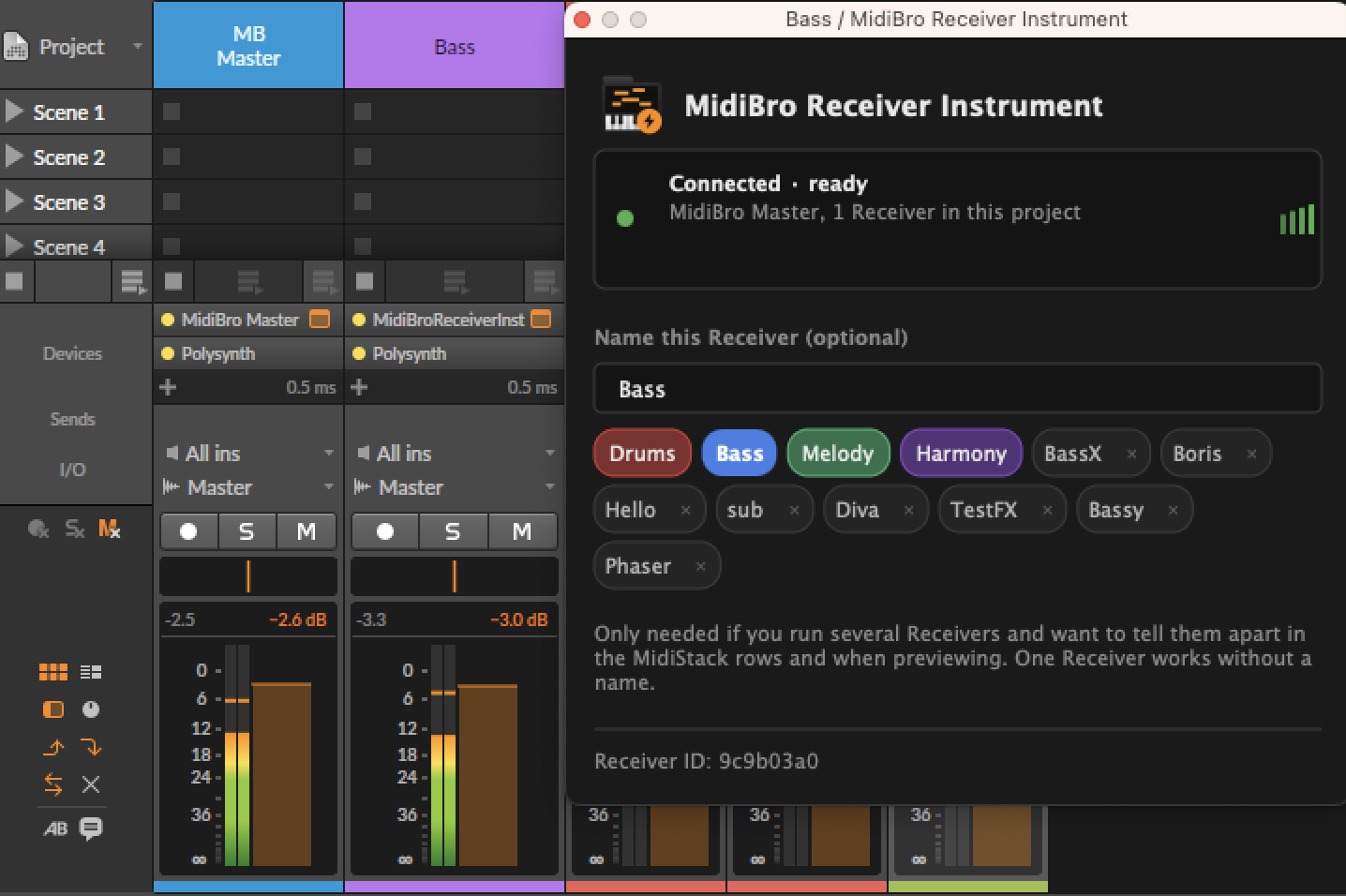
Naming a Receiver
A Receiver works without a name. Naming it (Drums, Bass, Melody) only matters once several Receivers run in one project and you need to tell them apart in the MidiStack rows and while previewing.
Which plugin variant
Both Receivers work in Bitwig, because Bitwig will host either one in front of your synth:
- MidiBro Receiver Instrument is the one shown above and the one to reach for by default.
- MidiBro Receiver, the MIDI-FX build, works just as well. Bitwig files it under Audio FX, not under Note FX, because it keeps a silent stereo output through which it reads tempo and position from the host. Look for it there rather than where you would expect a MIDI effect.
Troubleshooting
| Problem | Solution |
|---|---|
| Plugin not found | Settings -> Plug-ins -> Locations -> Rescan |
| No sound | The Receiver has to sit before (left of) the synth in the chain |
| No sound | Check the track is not muted |
| Header says “Disconnected” | Confirm the Master is loaded; they connect automatically, allow a few seconds |